
How to Install Theme
There are several ways to install WordPress theme. It’s up to you which one to choose 🙂
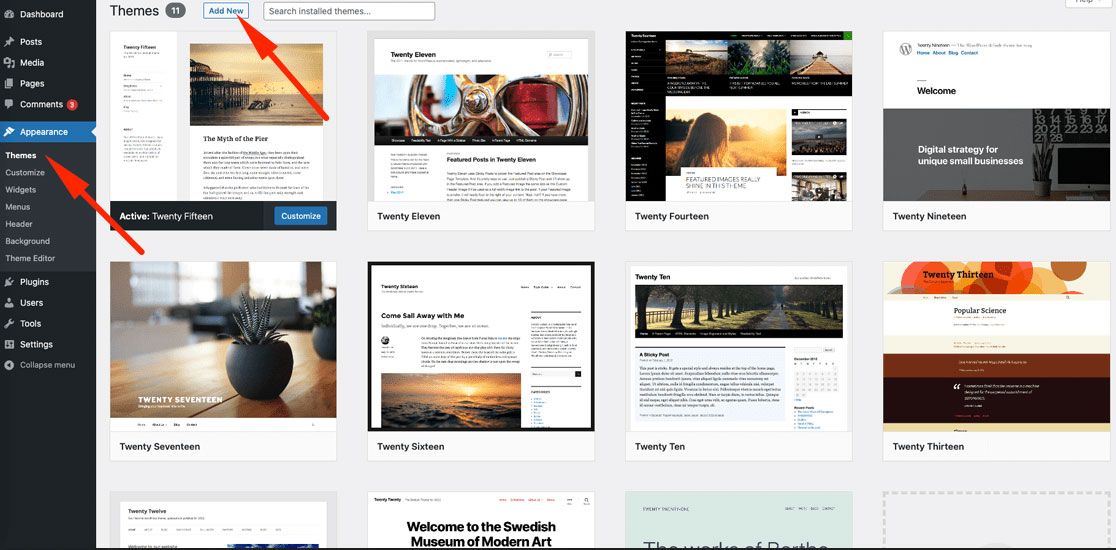
Add a Theme via WordPress dashboard :
Step 1 – Log into your WordPress dashboard and navigate to Appearance -> Themes section;
Step 2 – There is a button “Add New”, please click it and add the installable theme zip file;
Step 3 – Activate the added theme Appearance -> Themes
Upload WordPress Theme via FTP :
Step 1 – Please unzip the installable zip file that you’ve downloaded (ewebot.zip). In case, if you’ve downloaded the main zip file “Utah WP.zip”, please unzip it and use the installable one located in the following folder “Theme v…” ;
Step 2 – Upload “ewebot” theme folder to the theme directory (/wp-content/themes/) of your WordPress website using FTP. You can use any FTP client to do that;
Step 3 – Log into your WordPress dashboard and activate “ewebot” theme in Appearance -> Themes section;
Step 4 – At the top of the WordPress dashboard, you will see a message ‘This theme requires the following plugins…’, please install and activate all those plugins.
Getting this Error?

To resolve this issue, please contact your hosting provider and ask them to increase Upload File Size up to 30MB for WordPress.
It can be done in php.ini file.